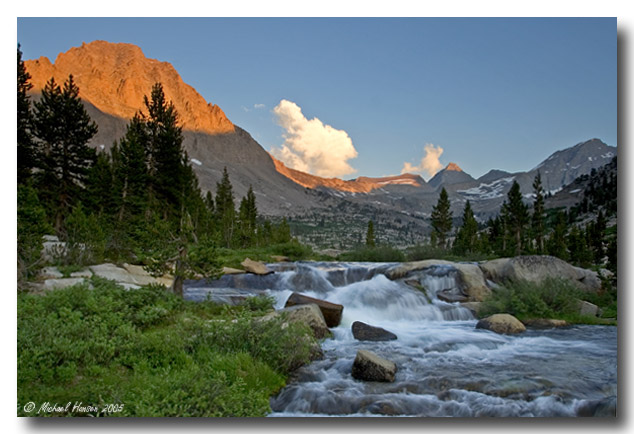
Topics covering photography and videography of the flora, fauna and landscape of the Sierra Nevada mountains. Show off your talent. Post your photos and videos here!
1) Go to wherever your photo is posted on the web (ie Photo.net, etc - for Flickr users, scroll down to the next post after this).
2) Right mouse click directly on the image, and select "properties" from the menu.
3) Highlight the image URL you see by pressing and holding down your left mouse button. Then, right mouse click directly on the highlighted link and select "copy".
4) In your post, right mouse click and select "paste" to add the image URL.
5) Now highlight the URL you just pasted into your post and then click the "IMG" button up above. This adds bracketed "img" code around your link. When you hit submit, you should see the photo in the completed post!
This is what it looks like after you have added the "IMG" tag:
Now click on the "Submit" button and your post should show the image just like this:
Last edited by ERIC on Mon Nov 28, 2005 9:22 pm, edited 11 times in total.
I'm not going to say which site is better. At this point I would like you all to do that for me. Many of you have your photos/albums stored on various websites. Please post some of the options out there on this thread, and why or why not the site is a good place to keep your photos.
I will say that some sites do not work for this kind of thing. We have had problems with Webshots and a few others. Some sites like Webshots have a script written into their software that does not allow "hotlinking", which is what we are doing here. In the future, I will provide a photo album where members can post their photos and you will be able to hotlink your photos from that location without any problems.
You would first need to set up an account with one of the free photo hosting services out there (here's a link to a thread where fellow members discussed the various options out there viewtopic.php?t=1017 ). This serves two purposes... One, it gives you an online album of all of your photos to share with your friends and family that can be viewed from any computer in the world. Second, you are able to copy the location of a particular photo and include it in message board posts (instructions for that are in this thread).
For those who use flickr, the community guidelines specify that the photo on an external site must link back to its photo page (other photo communities have similar rules, and while I'm not familiar with them, the process is most likely similar).
To do this in the forum, click the buttons URL, IMG, IMG, URL.
You should see "" in the text box.
-------------------
--------------------
Go to the flickr photo page and click on "all sizes"
--------------------
--------------------
In the new page below the photo, there is an "html" section. Copy the text in quotes after href=.
--------------------
--------------------
In the forum, after [url place an '=' then paste the text from flickr.
Go back to the photo and copy the text in quotes after src=. Paste this text between the img tags.
--------------------
--------------------
Here's how it should look like in the forum
--------------------
--------------------
There you have it. The photo is displayed, and if clicked links back to your flickr page.
--------------------
Cheers to SSSdave for pointing out that I've never really said what size photos should be to display properly in the thread frames without being clipped off. Can't believe I overlooked this. Sorry, guys!
BTW, prime example of why it's important to let me know when you have questions or suggestions for this site. it's far too easy for one man to overlook even the most obvious details.
Ok, so many of you have probably noticed that sometimes the horizontal on a hotlinked photo is clipped off if it's larger than a certain size. The vertical pixel size to keep in mind for that is 550. Anything larger will be clipped on the right side of the photo. I'm currently awaiting the release of a new forum and template version to correct this issue. In the meantime, if you don't have the means and/or know-how to resize your photos to that width, you can either opt to post your photos using the forum's attachment feature, or message/email me and I'll work with you to figure out another way that works for you. Happy to resize the photos for you if that's something you need help with.
So, thanks to trailblazer for the idea, you now don't have to worry about your hotlinked photos being cutoff. There's a new button when posting with the label "rimg". Use this in place of the button "Img" when hotlinking a photo. It resizes your photos to fit correctly, and also turns your photo into a link to the original image. Here's an example of a photo by Windwalker. The first image is cutoff when the "Img" bbcode tag is used, and the second is good to go using the "rimg" bbcode tag.
Update for Flickr users: the new photo page at Flickr makes things much easier to post photos here (or any forum that uses BB Code). Here's how:
Click on the 'Share this' link above your photo. That opens a drop-down menu.
Click on 'Grab the HTML/BB Code'.
Check 'BB Code'.
Right click in the text box and copy.
Paste into your HST post (no re-formatting necessary). This gives you a photo that links back to the photo page on Flickr, plus "[image name] by [your name]" with a link back to your photostream (I just cut that part out as unnecessary, but if you want it it's there).